


Drop your GIFs
Drag in one file or a batch, pick from your device, and start editing without uploading to a server.
Work with GIFs faster, smarter, and more securely in one place. GIF Toolkit brings together a complete collection of browser based GIF tools that help you create, edit, optimize, convert, and analyze animated images without uploading them to a server. Whether you are making social media content, preparing marketing assets, building memes, or optimizing animations for websites, everything happens directly on your device.





Loved by creators on Product Hunt
Popular tools
Swipe to browse
Explore the most popular tools used by creators every day. From creating new GIFs to reducing file sizes and converting formats, these tools cover the most common animation workflows in one place.
Turn MP4 videos into high quality animated GIFs directly in your browser. Select the best moments from a recording, tutorial, gameplay clip, product demo, or social media video and convert them into smooth, shareable GIFs. Control frame rate, dimensions, playback speed, and quality for the perfect balance between visual clarity and file size.
Compress GIF files online with GIF Compressor to reduce their file size while keeping them in GIF format. Adjust the lossy compression level, compare the original and compressed file sizes, and download the result directly from your browser. You can compress one GIF or process multiple GIFs with the same settings.
Resize animated GIFs quickly and easily with our browser-based GIF Resizer. Change the width and height of your GIFs, choose from preset sizes, or adjust custom dimensions while keeping your animation smooth and intact.
Crop animated GIFs quickly and accurately with our browser-based GIF Cropper. Remove unwanted borders, trim empty space, or focus on the most important part of your animation while keeping every frame smooth and consistent.
Create an animated GIF from images online with GIF Maker. Upload multiple images, arrange your frames, choose the playback speed, and turn your image sequence into a GIF directly in your browser. It is useful for simple animations, image sequences, tutorials, presentations, social posts, and other creative projects.
Combine multiple GIF files into a single continuous animation. Merge reaction GIFs, tutorials, demonstrations, or creative sequences without switching between different editing applications.
Change GIF colors online with GIF Color Changer. Recolor an animated GIF, replace specific colors, edit GIF colors, or adjust its hue without changing the animation itself.
Convert animated GIFs into H.264 MP4 videos for smaller social embeds, messaging apps, and universal playback. MP4 is the most widely supported video container — ideal when you need reliable autoplay, progressive download, and broad device compatibility rather than transparent backgrounds.
Browse the full collection of GIF tools. From simple conversions to advanced optimization, everything you need is available in one place.
Create an animated GIF from images online with GIF Maker. Upload multiple images, arrange your frames, choose the playback speed, and turn your image sequence into a GIF directly in your browser. It is useful for simple animations, image sequences, tutorials, presentations, social posts, and other creative projects.
Create funny and engaging GIF memes with our GIF Meme Maker. Turn your favorite animated GIFs into shareable memes by adding custom captions, reaction text, and creative messages directly in your browser.
Bring still photos to life by creating subtle animated cinemagraphs. Blend motion with static imagery to produce eye catching visuals that stand out in advertisements, portfolios, websites, and social media posts.
Record your screen and instantly convert recordings into animated GIFs. Ideal for software demonstrations, tutorials, bug reporting, educational content, product walkthroughs, and technical documentation.
View detailed information about any GIF with our browser-based GIF Metadata Viewer. Check dimensions, file size, total frame count, animation duration, estimated frame rate, loop settings, and whether the GIF is static or animated all without modifying the original file.
Count the exact number of frames in any GIF with our browser-based GIF Frame Counter. Quickly check whether a file is static or animated, view the total frame count, and inspect frame timing details without modifying the original GIF.
Analyze the colors used in any GIF with our browser-based GIF Color Palette Viewer. Extract dominant colors, view HEX color codes, and understand the overall color palette of animated GIFs without changing the original file.
Turn MP4 videos into high quality animated GIFs directly in your browser. Select the best moments from a recording, tutorial, gameplay clip, product demo, or social media video and convert them into smooth, shareable GIFs. Control frame rate, dimensions, playback speed, and quality for the perfect balance between visual clarity and file size.
Browse GIF tools by workflow instead of long feature lists. Create, convert, and optimize animations quickly with fast, private, browser-based processing.
Convert GIFs to popular image and video formats or create GIFs from videos and image sequences in just a few clicks. Whether you need GIF to MP4, GIF to WebM, GIF to WebP, GIF to PNG, MP4 to GIF, WebM to GIF, or image to GIF conversions, every tool is optimized for speed, quality, and privacy. Your files stay on your device throughout the entire conversion process, eliminating lengthy uploads while delivering professional quality results.
Edit animated GIFs without downloading complicated software. Resize, crop, compress, trim, reverse playback, change animation speed, merge multiple GIFs, remove unwanted frames, add text, apply watermarks, change colors, and enhance visual quality using intuitive browser based tools. Every edit is processed locally, allowing you to preview changes instantly before exporting the final animation.
Create animated GIFs from images, videos, screen recordings, or custom frame sequences with complete creative control. Build engaging memes, product demonstrations, tutorials, social media content, presentations, and marketing assets by adjusting frame timing, playback speed, dimensions, and export quality. Whether you're creating a simple animation or a professional visual asset, GIF Toolkit provides everything you need in one place.
Understand exactly what's inside your GIF before editing or sharing it. Analyze frame count, dimensions, animation duration, color palette, metadata, and other technical details using specialized analysis tools. Developers, designers, and creators can inspect GIF properties, troubleshoot performance issues, and optimize animations with greater confidence while keeping every file completely private.
Three steps. No uploads. No waiting. Drop a file, adjust with a live preview, then download. Everything runs in your browser.
Drag in one file or a batch, pick from your device, and start editing without uploading to a server.
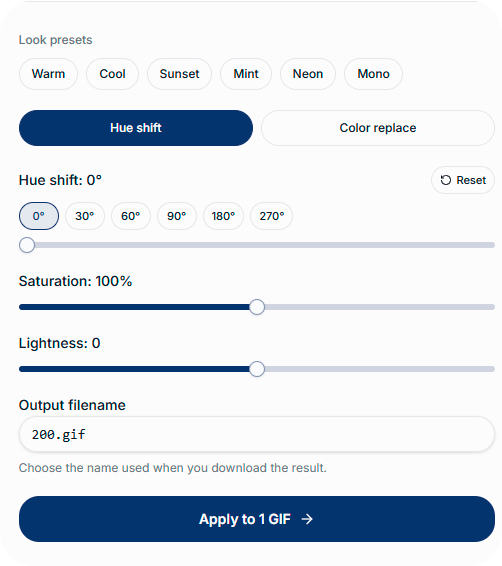
Tune hue, saturation, or color replace while the preview updates instantly across every frame.
Check before and after, set your filename, and download instantly no queues or account needed.
GIF Toolkit brings together everything you need to edit, convert, create, optimize, and analyze animated GIFs in one place. Every tool is designed with speed, privacy, and ease of use in mind, making it simple for beginners and professionals to complete GIF tasks without installing software.
Whether you are creating content for social media, optimizing GIFs for websites, preparing marketing assets, or managing creative projects, GIF Toolkit provides reliable browser based tools that help you work faster while keeping your files private.
Most tools process your files directly in your browser, helping keep your content on your device without unnecessary uploads. This approach provides faster results while protecting your privacy.
Access a growing collection of GIF tools including converters, editors, creators, optimizers, and analyzers from a single website. Everything you need is available in one organized workspace.
Upload your file, adjust your settings, preview the result, and download your finished file in just a few steps. Every tool is designed to save time without sacrificing quality.
Start using free tools immediately without creating an account. Premium features can be unlocked instantly using a simple license key.
GIF Toolkit is trusted by designers, developers, marketers, educators, businesses, and content creators who need dependable GIF editing and conversion tools for everyday work.
New tools, performance improvements, and feature enhancements are added regularly to keep GIF Toolkit modern, reliable, and ready for new creative workflows.
GIF Toolkit is designed around privacy, secure activation, and browser based processing. Your files, license data, and workflow stay under your control whenever possible.
Premium access uses a license key instead of usernames, passwords, or profile data that could be exposed in a breach.
Every connection to GIF Toolkit is protected with HTTPS encryption, helping keep communication between your browser and our site secure.
Your activated license and preferences are stored locally in your browser whenever applicable, keeping activation data under your control.
Most tools process files directly in your browser without uploading your GIFs, videos, or images to our servers.
Remove your license from any browser at any time through license settings if you switch devices or no longer need premium on that device.
Privacy is one of the core principles behind GIF Toolkit. Every supported tool is designed to process files directly inside your browser whenever possible, giving you full control over your data from start to finish. Your personal files remain on your computer, helping reduce privacy concerns while providing a faster editing experience without unnecessary uploads.
Your GIFs, videos, and images are processed locally instead of being uploaded to our servers. This not only protects your privacy but also speeds up your workflow by removing the time normally spent uploading large files.
We don't analyze, scan, or monitor the files you process with our browser based tools. Your creative work remains yours, allowing you to edit sensitive, personal, or business related content with greater confidence.
Premium features are unlocked using a simple license key instead of requiring a complicated account system. Activate your license, access premium tools, and continue working without unnecessary registration steps or profile management.
Your preferences, recent settings, and license information are stored locally in your browser whenever applicable. This allows GIF Toolkit to remember your workflow while keeping your data under your control.
Every connection to GIF Toolkit is protected using HTTPS encryption, helping safeguard communication between your browser and our website while providing a secure environment for accessing all available tools.
GIF Toolkit is designed around an open and flexible workflow. Start with any tool, move between editors and converters as needed, and complete your entire project without switching between multiple websites or installing desktop software.
Your GIFs, videos, and images are processed locally instead of being uploaded to our servers. This not only protects your privacy but also speeds up your workflow by removing the time normally spent uploading large files.
We don't analyze, scan, or monitor the files you process with our browser based tools. Your creative work remains yours, allowing you to edit sensitive, personal, or business related content with greater confidence.
Premium features are unlocked using a simple license key instead of requiring a complicated account system. Activate your license, access premium tools, and continue working without unnecessary registration steps or profile management.
Your preferences, recent settings, and license information are stored locally in your browser whenever applicable. This allows GIF Toolkit to remember your workflow while keeping your data under your control.
Every connection to GIF Toolkit is protected using HTTPS encryption, helping safeguard communication between your browser and our website while providing a secure environment for accessing all available tools.
GIF Toolkit is designed around an open and flexible workflow. Start with any tool, move between editors and converters as needed, and complete your entire project without switching between multiple websites or installing desktop software.
Have questions about GIF Toolkit? Here are answers to the most common questions about privacy, security, features, and how our tools work.
No, GIF Toolkit is built around privacy first processing. Most tools process your files directly in your browser, which means your GIFs, videos, and images remain on your device instead of being uploaded to our servers. This approach helps protect your privacy while making editing and conversion significantly faster.
GIF Toolkit offers a growing collection of free tools alongside premium features for users who need more advanced capabilities. Premium access is activated using a license key, giving you access to exclusive tools, advanced editing features, and future updates without requiring a traditional account or monthly sign up process.
Yes. Many GIF Toolkit tools are available free of charge and can be used without creating an account. If you need advanced editing features or premium only tools, you can upgrade at any time using a license key while continuing to enjoy the same fast, browser based experience.
GIF Toolkit is designed to work with all modern desktop browsers, including Google Chrome, Microsoft Edge, Mozilla Firefox, Brave, Opera, and other Chromium based browsers. For the best performance and compatibility, we recommend using the latest version of your preferred browser.
The maximum file size depends on your browser, available system memory, and the specific tool you're using. Since processing happens locally on your device, larger files generally require more memory and processing power. Most everyday GIF editing and conversion tasks work smoothly on modern computers.
You can remove your license at any time through the license settings within GIF Toolkit. Once removed, premium features will no longer be available on that browser until the license key is activated again. This gives you flexibility when switching devices or managing your license.
Shift hue, boost saturation, or swap brand colors on every frame — with a live preview, no desktop app, and no upload to our servers.
Signup
Not required
Cost
100% Free